User input types
These input types are the controls a person sees in the Glance setup app on iOS and Android when they add your app to their Glance LED. The inputs your app declares turn into a setup form that the end user fills in on their phone, and each input type below is one kind of control they will see there: a text box, a dropdown, a color picker, a toggle, a date, and so on.
Set app_input_type on an input to choose the control the user gets. There are
seven. Each renders a real widget in the app and passes the user's value into your
app via ctx.inputs["<key>"].
Free text
A plain text box, zip codes, names, symbols.
Dropdown
Pick one from a choices list.
Selection
Pick several from a choices list.
Checkbox
An on/off toggle, "live games only".
Date
A date picker, a countdown target.
Date (past)
A date picker capped at today, a birthday.
Color
A color wheel / picker, text tint.
How they look in the app
The controls above are what a person taps and fills in when they add your app. The
two free-text inputs in the Traffic Tracker app are a real example:
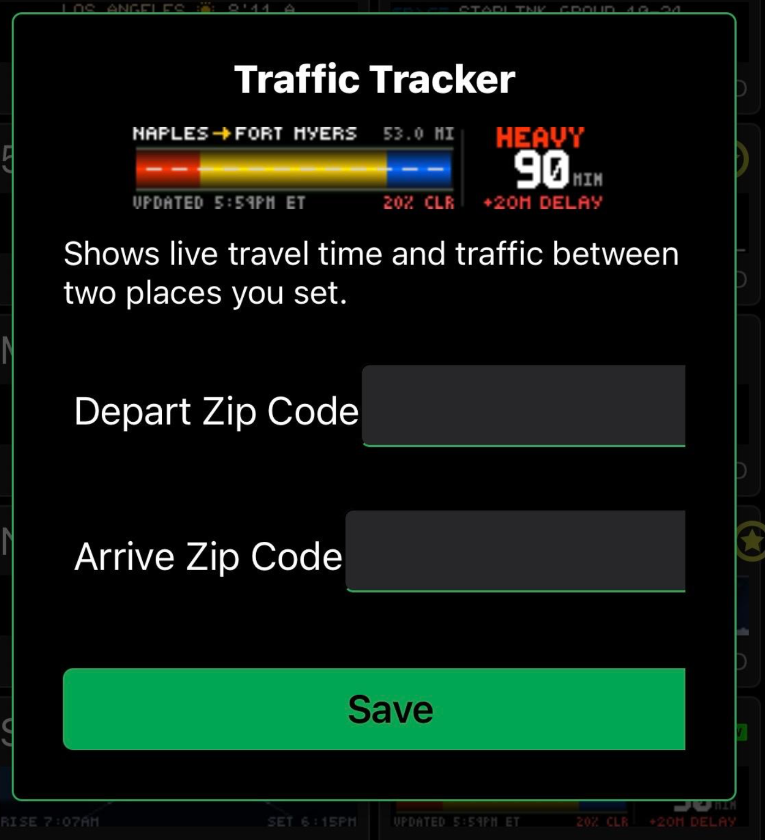
free-text input becomes a text box like these two zip-code fields.Using them
inputs:
  - key: units
    app_input_type: dropdown
    type: choice
    label: Units
    default: metric
    choices: [metric, imperial]
  - key: birthday
    app_input_type: date-past
    type: string
    label: Your birthday
Then in app.star:
def main(c, ctx):
    units = ctx.inputs["units"]        # "metric" or "imperial"
    bday  = ctx.inputs["birthday"]     # "1994-08-12"
app_input_type is optional. If you omit it, the form falls back to your type
(choice becomes a dropdown, everything else becomes free text). Set it when you want a nicer
control than a text box.