Inputs & configuration
Inputs are the settings a person fills in when they add your app in the Glance
app: a zip code, a color, a team. Each input you declare in the manifest becomes a
control the user sees on the app's setup screen, and its value shows up in your
code through ctx.inputs.
What the user actually sees
When someone adds your app in the Glance app, each input you declare becomes a
control they fill in. For example, the Traffic Tracker's two
free-text inputs (a start and an end zip code) look like this in the app:
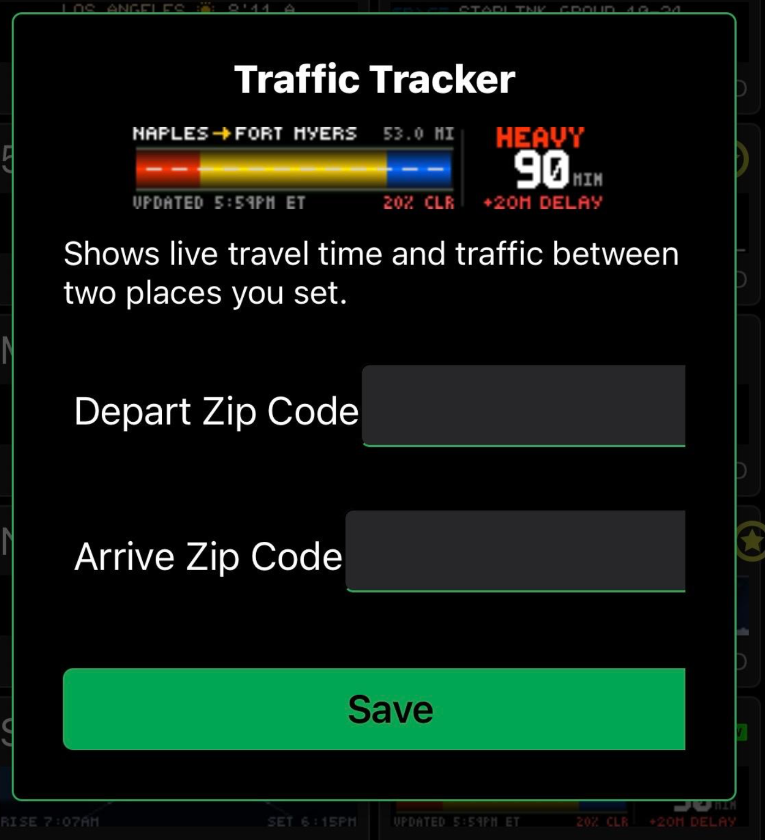
free-text inputs become the two text boxes here. This is what your users see when they add your app.The manifest that produces those two boxes:
inputs:
  - key: depart_zip           # your code reads ctx.inputs["depart_zip"]
    app_input_type: free-text # a plain text box
    type: string
    label: Depart Zip Code    # the label the user sees
    default: "34102"
    help: Where your drive starts.
  - key: arrive_zip
    app_input_type: free-text
    type: string
    label: Arrive Zip Code
    default: "33901"
    help: Where your drive ends.
Anatomy of one input
  - key: zip                  # the name your code reads: ctx.inputs["zip"]
    app_input_type: free-text # the control the user sees (see below)
    type: string              # the data type
    label: Zip code           # the label next to the box
    default: "90210"          # pre-filled value
    help: A US zip code.      # hint shown under the box
Read it in app.star
Use .get(key, fallback). It returns the fallback if the value is missing, so your
app never renders a blank panel:
def main(c, ctx):
    depart = ctx.inputs.get("depart_zip", "34102")
    c.text(depart, 4, 12, font="5x7", color="green")
Two habits worth building:
- Always pass a fallback.
ctx.inputs["zip"]works too, but.get()with a default means a blank or missing value degrades gracefully instead of erroring. - Uppercase text before drawing. The bitmap fonts have no lowercase letters, so
use
c.text(city.upper(), ...). Otherwise a user who types "boston" sees nothing.
Pick the right control
app_input_type decides the widget. There are seven: a text box, a dropdown, a
multi-select, a checkbox, two date pickers, and a color wheel.
A dropdown needs a choices list:
  - key: units
    app_input_type: dropdown
    type: choice
    label: Units
    default: metric
    choices: [metric, imperial]
API keys
Some apps pull from a data provider that needs a key (a traffic or weather service,
for example). Declare it as a free-text input the user pastes in:
  - key: api_key
    app_input_type: free-text
    type: string
    label: API key
    help: Paste the key from your provider account.
Your code reads it like any other input and passes it to
http.get as a header or query parameter, whichever your
provider expects:
def main(c, ctx):
    key = ctx.inputs.get("api_key", "")
    resp = http.get("https://api.example.com/v1/data",
                    headers = {"x-api-key": key})
A key a user enters is stored encrypted on Glance's servers. It is never written
into your app code and never sent to the panel. At render time it arrives in
ctx.inputs, your app hands it to http.get, and the GDN host (not the panel, and
not the Starlark sandbox) makes the actual network request.
See the Bitcoin price example for a full app that uses an API key and parses a live JSON response.
Editing the manifest
You can edit manifest.yaml by hand, or open your app in
Glance Dev Studio to edit the manifest and app code side by side with a
live preview.