Examples & lessons
The most popular panel apps fall into a handful of shapes: a clock, the weather, a price ticker, a rotating fact, a countdown, a scoreboard. Below is the one-line prompt you'd send for each (right after the cheat-sheet), the result, and the one lesson that app teaches about steering the AI.
Every render below came from a prompt plus the cheat-sheet, then a quick preview to catch the AI's usual slip-ups, collected at the bottom of the page.
The top-5-movies walkthrough builds one app against a real API across four iterations, showing exactly how you reprompt and hand-edit from a plain list to a polished poster card.
A big clock
Build a GDN app that shows a large HH:MM clock for a 64×32 panel. Inputs: a UTC offset number, and a 12/24-hour dropdown.

The lesson: time is UTC. ctx.now is always UTC, so ask for a UTC-offset input
to get local time, rather than assuming the panel knows the user's timezone. And a
"blinking colon" can't blink, frames are still, so it's simply drawn on.
The weather
Build a GDN app that shows a city name and its current temperature, centered, with a units dropdown (metric/imperial). Fetch the temperature live.

The lesson: uppercase, centered, and check the fetch. The AI will often write
lowercase (which draws nothing) and forget to handle a failed request. Your prompt's job
is to remind it: "uppercase the text, center it, and check status_code before reading
http.get data."
A price ticker
Build a GDN app that shows the Bitcoin price from the CoinGecko API, with a small logo and a green/red arrow for the daily change.
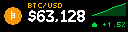
The lesson: live data is http.get, and always guard it. Fetch with
http.get(url, ttl_seconds=300), then check status_code and fall back to a dash
if it failed, so a flaky API never blanks the panel. The full build is written up in the
Bitcoin price example.
A rotating fact or quote
Build a GDN app that shows a short fact with a small icon and the label "FACT", wrapping the text across the panel.

The lesson: long text must be wrapped by hand. There's no scrolling marquee, so tell
the AI to wrap the text into lines with c.text_wrapped (or text_fit) and stop at the
bottom edge. Anything past 32px tall is simply off-screen.
A countdown
Build a GDN app that counts down the days to a date the user picks. Input: a target date. Show a big number of days and a label.

The lesson: handle the empty and past states. Ask for a date input, compute the
days from ctx.now, and draw a friendly "SET A DATE" when it's blank and a "DONE"
when it's passed, so the app never crashes on a missing value.
A scoreboard
Build a GDN app that shows two team abbreviations and their scores with a period label. Inputs for both team names and both scores.
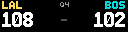
The lesson: lean on the helpers. One c.scoreboard("LAL", "BOS", 108, 102, status="Q4")
is the whole screen. Telling the AI to "use helpers where they fit" turns a page of
layout math into a single line. See the helper functions.
The mistakes to head off
Across every one of those apps, an AI makes the same handful of mistakes, because it can't see the panel and it's used to bigger screens. Head them off in your prompt:
| The AI's default | What GDN needs | Put this in your prompt |
|---|---|---|
| Lowercase text | Fonts are uppercase-only | "Uppercase all text (.upper())." |
| Animations, scrolling, blinking | Still frames | "Draw one still image; no animation." |
| Returns a layout / widget tree | You draw with c.* | "Draw immediately with c.*; return nothing." |
| Assumes a big screen | 32px tall, keep it short | "Target a 128×32 panel; keep text short." |
| Uses local time | ctx.now is UTC | "Time is UTC; add a UTC-offset input." |
| Ignores failed requests | Guard every fetch | "Check status_code before reading http.get." |
| Overflowing long text | Wrap and clip by hand | "Wrap text with c.text_wrapped; stop at the edge." |
| Pastes a full-size image | Panel-sized assets | "Draw images at 16px; declare them in assets:." |
The pattern that works
- Paste the cheat-sheet.
- Describe the app in one or two sentences, naming the inputs and the panel width.
- Preview it in Studio or with
gdn check apps/<id>. - Paste any error back to the AI and ask it to fix the code.
Two or three rounds of that gets almost any of these apps working. When you're happy, submit it.